codetoad.com
  ASP Shopping CartForum & BBS
  - all for $20 from CodeToad Plus!
  
  Home || ASP | ASP.Net | C++/C# | DHTML | HTML | Java | Javascript | Perl | VB | XML || CodeToad Plus! || Forums || RAM 
Search Site:


Home » DHTML » Article

Simple Thumbnail Solution

Article by:  Troy Wolf  ( 372 ) (7/16/2004)
Bookmark us now! Add to Favourites
Email a friend!Tell a friend
Summary: This simple script allows the user to select from several thumbnail images and view the larger image, using a mixture of DHTML and Cascading style sheets.
Viewed: 78457 times Rating (22 votes): 
 4.3 out of 5
 Rate this Article  Read Comments  Post Comments

Simple Thumbnail Solution


Online Demo


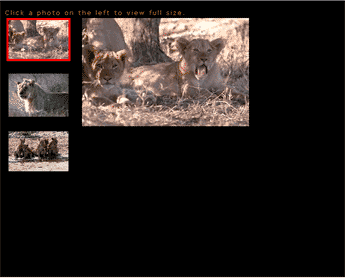
Suppose you have a series of images in thumbnail and you would like the user to easily browse through them. In this script we will create three thumbnail images and a larger copy of the selected image will be displayed on the right of the screen. We will also highlight the currently selected thumbnail.

This script shows how to use CSS to format your page as well as how to use javascript to dynamically change the CSS properties of the page elements. It also has a DHTML technique to change the source of an image tag. Copy & Paste this into a new HTML file, then open in your browser.

Select All Code


Article by Troy Wolf, Shiny Solutions


CodeToad Experts

Can't find the answer?
Our Site experts are answering questions for free in the CodeToad forums
Rate this article:     Poor Excellent
View highlighted Comments
User Comments on 'Simple Thumbnail Solution'
Posted by :  sehrlund at 22:15 on Friday, March 18, 2005
How could this script be modified to include "Previous" and "Next" buttons next to the enlarged image. I have seen this on other sites and it comes in pretty handy when there is a sizeable number of thumbnails to view.

Thanks,
...Sylvia
Posted by :  quaker at 23:27 on Sunday, October 30, 2005
Would appreciate some help. The abovve code doesnt work for me even when I change the paths to my computer and change the images to images that I have.

I think I lose it on when it says to change image on click to image (1). Where is image 1?

Is this in dreamweaver when you start making images and it goes through them as image 1 by default etc.
Posted by :  mdune at 15:48 on Friday, March 23, 2007
Simple and clean - this code works well. Any idea on how to include captions under the selected picture? Thanks.
Posted by :  seep at 10:09 on Thursday, April 12, 2007
Great script!

I am testing it for effectiveness in teaching. I put up 13 images of slides in flikr, then am linking to the image urls using this code on one of my web pages. I edited the page layout a little. Check it out if you want at http://fit.gtc.edu/slideshowtest1.html

These are text images, and they're a bit hard to read in the thumbnails. I increased the thumbnail size, but didn't have enough room to get them all to fit on a page. Although these slides are for review, and I'm only shooting for recognition of the thumbnails, not total legibility.

<Added>

<whoops> flickr
Posted by :  cunverdi at 13:39 on Tuesday, June 05, 2007
Thanks for this great code. I applied it to my site; Here's you may see; http://www.geocities.com/cunverdi/karelerim

<Added>

Thanks for this great code. I applied it to my site; Here's you may see; http://www.geocities.com/cunverdi/karelerim

Ps: Those are my photos :)
Posted by :  Yoskie at 11:59 on Wednesday, October 10, 2007
I am attempting to build a website using websitetonight. The code appears to work until I publish my page then I get empty boxes with X's in them. The images simply vanish. Clearly I am doing something worng. I want to use this method because putting an immage direcly on the page takes up too much disk space. Is there a way around this? Where should the original images be held? How do I properly designate the path to the images? Please help me because I don't have a clue.


Thanks,
Yoskie
Posted by :  scooter at 07:42 on Wednesday, January 23, 2008
I just found this code and it is great. It works fine, but I would like to be able to expand it.

I would like to be able the have a series of thumbnail images but be able to have 2 larger copies of the the selected image be displayed on the right of the screen and underneath the first set of thumbnails and large image. I have a lot of thumbnails, so when you click on the last one you have to scroll back up to the top of the page to see the large image. This is not convenient for viewers.

I would like to have 10 thumbnails and be able to view the large image at the top, then have another different 10 thumnails a little lower on the page. When those thumbnails are clicked, I would like to have another large image just for the second set of thumbnails in the middle of the page.

Is this possible?

Thanks,

Scooter
Posted by :  prettybird408 at 15:10 on Monday, May 19, 2008
This code works perfectly...thank you!! I am a makeup artist in the process of building a website. This came in handy!! I would however like to know how to add more pictures to it and also how to remove the right side scroll bar. I appreciate you taking the time to respond.

Thank you:)


To post comments you need to become a member. If you are already a member, please log in .


RELATED ARTICLES
Simple Thumbnail Browsing Solution
by Troy Wolf
This simple script allows the user to select from several thumbnail images and view the larger image, using a mixture of DHTML and Cascading style sheets.
Creating CSS Buttons
by Thomas D. Greer
With Cascading Style Sheets, you can turn ordinary hyperlinks into fully functional "buttons", without using JavaScript.
DHTML Javascript Ticker
by Premshree Pillai
This is a JavaScript Ticker which ticks a number of messages like the one shown above. It also has a useful 'Show All' feature.
DHTML Horizontal Scroller
by Premshree Pillai
Scroll text horizontally when the user hovers over a link.
Manipulate Scrollbar Colors Using CSS and JavaScript
by Mike Thompson
The thing about the default color of scrollbars is that it's dull and ugly -- usually this color is gray. Wouldn't it be nice to change this color to better fit the overall theme of your site? Luckily, Cascading Style Sheets and JavaScript can be used to do just that!
DHTML Scrolling Image
by Premshree Pillai
Using this script the user can scroll an image left or right by clicking a buttong
DHTML News Bar
by Premshree Pillai
This is the News Bar script which displays a number of messages and rotates them using DHTML.
DHTML Zoom In and Out Script
by Premshree Pillai
Using zoOom, you can zoom in and zoom out any image that is specified in the code.
DHTML Image Zoom Out
by Premshree Pillai
Click on the image and it zooms out and disappears. This script could be a way to handle advertising or other images.
Simple Mouse Trail using VB Script
by Jeff Anderson
With IE gaining in prominence every day, it's becoming acceptable to use VBScript in web pages. That makes some activities like the mouse trail a real cinch.


Recent Forum Threads
• Regular Expression Query Replace -- Twice Wrongly
• Processing MS Office documents with Java
• Re: help!
• Re: Can javascript preload swf files?
• ADODB.Recordset error (0x800A0CB3)
• Need Your Inputs About Level Editor Interface
• `section` is an unexpected token. Expecting white space. Line 1, position 137.
• Javascript rollover toggle help please!
• help monitoting cpu load on windows machine


Recent Articles
ASP GetTempName
Decode and Encode UTF-8
ASP GetFile
ASP FolderExists
ASP FileExists
ASP OpenTextFile
ASP FilesystemObject
ASP CreateFolder
ASP CreateTextFile
Javascript Get Selected Text


© Copyright codetoad.com 2001-2009